The right HVAC CRM software eliminates these pain points by centralizing customer data, automating scheduling and dispatch, streamlining invoicing, and giving technicians mobile access to everything they need in the field. This guide reviews the best HVAC CRM software options available today, highlights the features that matter most, and helps you choose the right fit based on your business size and operational goals.
TL;DR
- HVAC CRM software centralizes customer data, scheduling, invoicing, and field operations—replacing spreadsheets and disconnected tools
- Trade-specific CRMs are better suited for HVAC workflows than general-purpose platforms that require costly customization
- Top options reviewed: ServiceTitan, Jobber, Housecall Pro, FieldEdge, and Service Fusion, each built for different business sizes and budgets
- Prioritize scheduling/dispatch, mobile field app, customer history tracking, automated invoicing, and reporting capabilities
- Don't choose on brand alone—compare total cost (including add-ons), room to grow, and how well it fits your existing tools
What Is HVAC CRM Software — and Why Do Contractors Need It?
HVAC CRM (Customer Relationship Management) software is a business management tool that centralizes customer interactions, service history, job scheduling, invoicing, and communication in one platform. Unlike generic CRM tools built for sales teams across all industries, HVAC-specific CRMs are designed for the workflows contractors actually use—dispatching technicians, tracking equipment warranties, managing service agreements, and invoicing from the field.
General CRMs vs. Trade-Specific Solutions
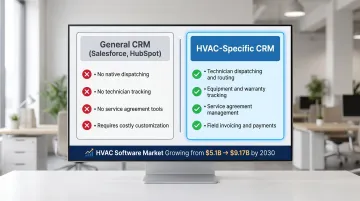
General-purpose platforms like Salesforce, HubSpot, or Zoho are built for pipeline management and lead nurturing — not field service operations. Salesforce positions Field Service Management as a separate product specifically because dispatching, work order management, and mobile workforce coordination don't exist natively in its core CRM.
For HVAC contractors, that gap matters. Relying on a general CRM means paying for expensive customization or third-party integrations to replicate what trade-specific platforms include out of the box:
- Technician dispatching and route optimization
- Equipment and warranty tracking by customer
- Service agreement management and renewal reminders
- Field invoicing and payment collection
The field service management market is growing rapidly, projected to expand from USD $5.10 billion in 2025 to USD $9.17 billion by 2030, as contractors move away from manual dispatching and paper-based job tracking toward software built for how their businesses actually run.
The platforms reviewed below were selected specifically for contractors — not sales teams — with that operational fit in mind.
Best HVAC CRM Software for Contractors
Each platform earned its spot based on five criteria:
- HVAC-specific workflow fit
- Scalability across business sizes
- Pricing transparency
- Mobile capability
- Contractor user reviews
ServiceTitan
ServiceTitan is a comprehensive, enterprise-grade field service management and CRM platform trusted by tens of thousands of contractors, including large HVAC businesses running both residential and commercial operations. Its all-in-one depth covers CRM, dispatching, automated customer communication (pre-appointment texts, GPS tracking), CSR scorecards, and QuickBooks integration. For scaling HVAC businesses, it's the most capable option in this list.
Why contractors choose it: ServiceTitan's native sales pipeline management, service agreement tools, call booking features, and extensive Pro add-on ecosystem (Marketing Pro, Fleet Pro, Dispatch Pro) deliver enterprise-level capabilities. The platform is best suited for mid-to-large operations due to its custom pricing model and feature depth.
| Category | Details |
|---|---|
| Best For | Mid-to-large HVAC businesses, commercial and residential operations |
| Key Features | Sales pipeline management, service agreement software, automated customer communication, GPS dispatch, CSR reporting, QuickBooks integration |
| Pricing | Custom per-technician pricing; three packages (Starter, Essentials, The Works); quote-based |
Third-party ratings: 4.3/5 on Capterra (325 reviews), 4.5/5 on G2 (353 reviews).
Jobber
Jobber is a popular field service platform built for small-to-medium home service businesses. It covers quoting, invoicing, client management, scheduling, and online booking in a user-friendly interface that non-technical teams can adopt quickly.
What sets it apart: Affordability and ease of setup for contractors who want clean workflows without enterprise complexity. Note that advanced features like review generation and photo documentation often require third-party add-ons (NiceJob, CompanyCam), which increase total cost beyond the base subscription.
| Category | Details |
|---|---|
| Best For | Small-to-medium HVAC businesses (1–10 technicians) |
| Key Features | Online booking, client hub, quote-to-invoice workflow, QuickBooks integration, mobile app |
| Pricing | Core from $29/mo annually; Connect from $149/mo; Grow from $299/mo; Plus from $529/mo; $29/user/mo for additional users |
Third-party ratings: 4.6/5 on Capterra (1,420 reviews), 4.6/5 on G2 (480 reviews).
Housecall Pro
Housecall Pro is a mobile-first field service platform designed for residential home service businesses, with a strong focus on simplicity, speed, and customer experience features like online booking and automated reminders.
What sets it apart: Instapay deposits funds in under 30 minutes (1% additional fee), enabling same-day payment collection. The interface is straightforward enough that staff without software experience get up to speed fast. Note that advanced reporting and visual pricebook features require higher-tier plans.
| Category | Details |
|---|---|
| Best For | Residential HVAC contractors with 1–30 employees |
| Key Features | Scheduling and dispatching, online booking, invoicing, review management, marketing automation, Instapay |
| Pricing | Basic: $59/mo annually ($79/mo monthly); Essentials: $149/mo annually; MAX: $299/mo annually (up to 8 users; $35/mo per additional user) |
Third-party ratings: 4.7/5 on Capterra (2,739 reviews), 4.3/5 on G2 (202 reviews).
FieldEdge
FieldEdge is a field service management platform built specifically for HVAC and other trade businesses. It offers scheduling, dispatching, service agreements, quoting, invoicing, and a technician mobile app with real-time, two-way QuickBooks integration.
What sets it apart: HVAC-specific workflow design reduces customization needs compared to general tools, and its native QuickBooks sync (two-way, real-time) eliminates manual data entry. FieldEdge serves both small and growing contractors who want a trade-focused solution without enterprise pricing.
| Category | Details |
|---|---|
| Best For | HVAC-specific contractors of small-to-mid size who prioritize accounting integration |
| Key Features | HVAC-specific dispatching, service agreement management, two-way QuickBooks sync, technician app, customer history |
| Pricing | Quote-based; three plans (Select, Premier, Elite) |
Third-party ratings: 4.2/5 on Capterra (306 reviews).
Service Fusion
Service Fusion is a flat-rate, cloud-based field service management platform built for growing HVAC teams. It offers customer management, scheduling, dispatching, invoicing, and GPS fleet tracking under a single subscription.
What sets it apart: Flat-rate pricing with unlimited users means no per-user fees, making it cost-effective for businesses adding technicians. GPS Fleet Tracking and ServiceCall.ai (VoIP/call tracking) are available as add-ons, so total cost can exceed base pricing depending on needs.
| Category | Details |
|---|---|
| Best For | Growing HVAC businesses adding technicians who need predictable, flat-rate software pricing |
| Key Features | Flat-rate pricing, unlimited users, GPS fleet tracking (add-on), customer management, dispatch, invoicing, QuickBooks integration |
| Pricing | Starter: $208/mo annually ($245/mo monthly); Plus: $325/mo annually; Pro: $533/mo annually |
Third-party ratings: 4.3/5 on Capterra (307 reviews), 4.1/5 on G2 (119 reviews).
Key Features to Look for in HVAC CRM Software
Scheduling, Dispatching, and Job Management
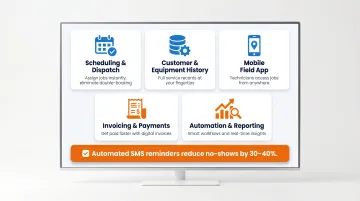
Your CRM must allow drag-and-drop calendar scheduling, technician assignment by skill level and location, and real-time dispatch updates. HVAC teams manage both planned maintenance visits and emergency service calls—often simultaneously. A centralized dispatch board with GPS visibility ensures technicians reach jobs faster, cutting drive time and maximizing billable hours.
Customer Database and Service History
Every customer record should store equipment details (make, model, serial numbers), past service records, warranty status, and communication history. This data enables:
- Faster call booking (CSRs see what equipment the customer owns)
- Better technician preparation (techs arrive knowing the equipment and past issues)
- Upsell opportunities on-site (identify aged equipment ready for replacement)
- Elimination of customer frustration from repeating information
Mobile Field App
Field technicians need iOS and Android access to job details, customer history, estimates, photos, and payment processing from the job site. A solid mobile app cuts calls back to the office, improves invoice accuracy, and gets payments collected on-site — no return trip to the shop required.
Invoicing, Estimates, and Payment Processing
The CRM should enable on-site quoting, fast invoice generation, and in-app payment collection. Good/better/best estimate formats improve close rates by presenting multiple service options at different price points. Same-day payment capability—like Housecall Pro's Instapay feature—improves cash flow and reduces collection delays.
Automation, Reporting, and Integrations
Look for automated appointment reminders, follow-up messages, review requests, and QuickBooks or accounting software integration. Automated SMS reminders reduce no-shows by approximately 30-40%, reclaiming lost revenue. Reporting dashboards reveal which jobs, technicians, and service types drive profitability — useful for staffing decisions, pricing adjustments, and identifying your highest-margin work.
How We Chose the Best HVAC CRM Software
Evaluation criteria included:
- HVAC-specific workflow fit — native dispatching, service agreement tracking, and technician management (not just generic sales pipeline features)
- Out-of-the-box features vs. add-on costs — total cost of ownership including modules, integrations, and per-user fees
- Mobile app quality — real-world usability in the field for iOS and Android
- Scalability — ability to support solo technicians through multi-truck operations
- Accounting integrations — seamless QuickBooks or other accounting platform sync
- Contractor reviews — real user feedback on ease of use, customer service, and reliability
These criteria matter because contractors routinely hit the same avoidable pitfalls during the selection process:
Common mistakes to avoid:
- Choosing based on brand recognition alone without evaluating workflow fit
- Ignoring total cost of ownership (base subscription + add-ons + per-user fees)
- Selecting a general CRM that requires costly customization to handle HVAC-specific tasks like dispatching or service agreement tracking
- Underestimating the importance of mobile app quality for field technicians
The right CRM depends on your business size and model. A solo residential technician has very different needs than a 20-person operation managing commercial maintenance contracts, so match the platform to where your business actually operates today.
Conclusion
The best HVAC CRM software matches your current operational stage, supports where you're growing, and delivers real workflow improvements—not just the one with the most features or the biggest name.
Quick recap:
- ServiceTitan leads for enterprise operations with extensive features and Pro add-ons
- Jobber and Housecall Pro suit smaller residential contractors prioritizing ease of use and affordability
- FieldEdge fits HVAC-specific workflows with strong QuickBooks integration
- Service Fusion offers cost-effective flat-rate pricing for growing teams
Trial shortlisted platforms before committing, review total cost including add-ons, and evaluate how well the mobile app works in real field conditions.
Once your CRM is running smoothly—customer data organized, scheduling efficient, invoicing reliable—your warranty program becomes the next profit center worth examining. WarrantyRE helps HVAC contractors replace third-party warranty providers with their own reinsurance company, so the underwriting profit stays in your business instead of flowing to an outside company.
Instead of paying external warranty companies on every installation, you retain 100% of warranty fees in a tax-advantaged structure that covers callbacks while building long-term business value. Start your Owner Analysis or call (804) 824-9533 to learn more.
Frequently Asked Questions
What is the best CRM software for HVAC businesses?
There's no universal best—ServiceTitan leads for enterprise operations, Jobber and Housecall Pro suit smaller residential contractors, FieldEdge fits HVAC-specific workflows, and Service Fusion is cost-effective for growing teams. Assess your business size, job volume, and operational needs first.
How can I get clients for my HVAC business?
CRM software supports client acquisition through online booking, automated follow-ups, review request automation (which improves Google rankings and local trust), and email/SMS campaigns to re-engage past customers.
What features should HVAC CRM software have?
Essential features include scheduling and dispatch, mobile field app, customer and service history database, invoicing and payment collection, and automation/reporting with accounting integrations.
How much does HVAC CRM software cost?
Entry-level plans start around $29–$79/month, mid-tier plans range from $149–$329/month, and enterprise solutions like ServiceTitan use custom pricing. Total cost including add-ons often exceeds the base subscription price, so evaluate full costs before committing.
What is the difference between a general CRM and an HVAC-specific CRM?
General CRMs like Salesforce or HubSpot are built for sales pipelines across industries and lack native dispatching, technician tracking, or service agreement management. HVAC contractors must pay for costly customization or third-party integrations to replicate what trade-specific CRMs include by default.
When should an HVAC contractor invest in CRM software?
If your business has multiple technicians, more than 15–25 weekly jobs, or a growing client base that's difficult to manage manually, a CRM will pay for itself through reduced scheduling errors, faster invoicing, and fewer missed follow-ups.